
Made in Pakistan

All-in-One Desktop: Complete Guide to Choosing a Desktop PC for Home and Office

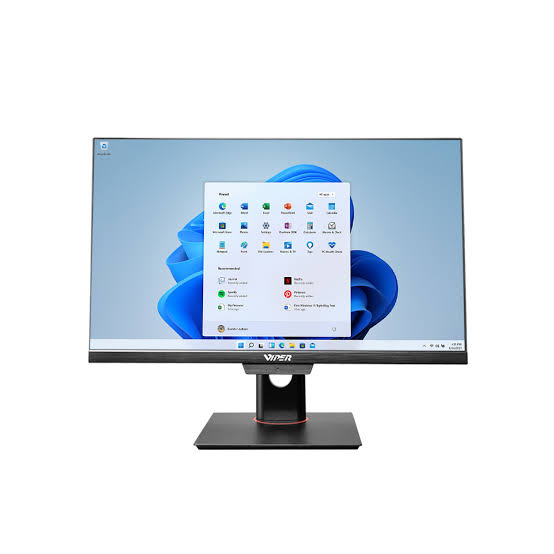
Adding a computer tower, cables, monitor and speakers on the desk takes up a lot of space and leaves less room for a notebook or documents. An all-in-one system helps in organizing a static workstation by integrating the major computer parts into one screen enclosure.
The decision is just one aspect of a cleaner desk. The hardware should support the applications, the gadget should be realistic to manage and the screen must be comfortable to use.
What Is an All-in-One Desktop and How Does It Work?
An all-in-one desktop is a single unit system which integrates major computing hardware and display. The storage saves your software and files; the processor operates applications and RAM stores present information. Instead of an individual tower, these parts stay behind the display enclosure.
You can still attach accessories through the given ports and use a mouse or keyboard. In some models, webcam, speakers and wireless connectivity may be inbuilt.
For instance, The K-Series of Viper includes microphone features, various screen sizes, networking options and integrated camera. To verify the included components, check the configuration.
This layout creates a single convenient space for video calls, administration and assignments in a shared household. In offices, it keeps the smaller work desks and reception spaces well-organized.
How Does a Desktop PC Compare With an All-in-One Desktop?
An all-in-one is also considered a desktop computer. The individual components are eliminated from your desk in an integrated system. But in a traditional desktop setup, you can easily choose a screen or replace components. This becomes crucial if you want a different display layout or a bigger screen in future.
Maintenance should also be considered. The compatibility and access changes in most models of all-in-one systems. However, it supports storage upgrades and memory. A right tower gives a greater room for expansion.
Think about the use of computers. A compact system may be ideal for a receptionist handling appointments. A user requiring additional hardware may choose an individual case.
What Should You Look for in a Pacer Desktop PC?
Examine the complete configuration of a Pacer PC if you want an individual monitor setup.
The M-Expeder range of Viper’s pacer gives memory support up to 64GB, SATA storage options, full tower formats, mini tower and Intel core processor options. Instead of considering them as normal incorporations, check these options in the reference.
Begin with your software. Engineering applications or video editing have different demands than everyday browsing and documents. The available memory, graphics hardware and exact processor should be verified against those needs.
After that, check the other components. Are there sufficient ports for drive, printer and speakers? Can the storage be added later? Is the system able to connect to the monitor?
A Pacer PC is ideal for offices and homes when these requirements are met. However, the model’s name cannot define these requirements.
Which All-in-One Desktop Features Matter for Work and Everyday Use?
A Screen You Can Read Comfortably
Display is a valuable component of the purchase. The resolution and size should be checked. A bigger screen does not mean more effective. The distance should be observed and the desk should be measured. Along with the touch accessibility around 23.8-inch option, Pluto B-Series of Viper offers full HD options of 23.8-inch and 21.5-inch.
Enough Memory and Responsive Storage
Storage keeps stored information while RAM promotes active tasks. 16GB RAM is an effective configuration for everyday multitasking. The operating system and applications load faster with an SSD.
Practical Calling and Connection Features
The microphone, webcam and speakers should be checked for online meetings and classes. Instead of assuming the system upholds a separate monitor, verify the ports carefully.
Comfortable Placement and Accessible Support
Check whether there is easy access to ports. The repair arrangements and warranty term should be verified. Ask for a configuration from Viper that aligns with your workplace.
FAQs
1. What is an all-in-one desktop computer?
It integrates the main computer hardware and screen into a single unit by using an individual keyboard and mouse
2. Is an all-in-one desktop better than a traditional desktop PC?
It is ideal for smaller workplaces. However, a traditional system provides greater extension adaptability.
3. What should I consider when choosing an all-in-one desktop?
The processor, storage, upgrade features, RAM and connectivity should be considered.
4. Is a Pacer Desktop PC suitable for home and office use?
Yes, if the configuration aligns with your workplace.
5. How long does an all-in-one desktop computer typically last?
The longevity depends on the maintenance, repairability, build quality and workload. It has no certain restorative interval.