
Made in Pakistan

How to Choose an All-in-One Desktop: A Complete Buying Guide

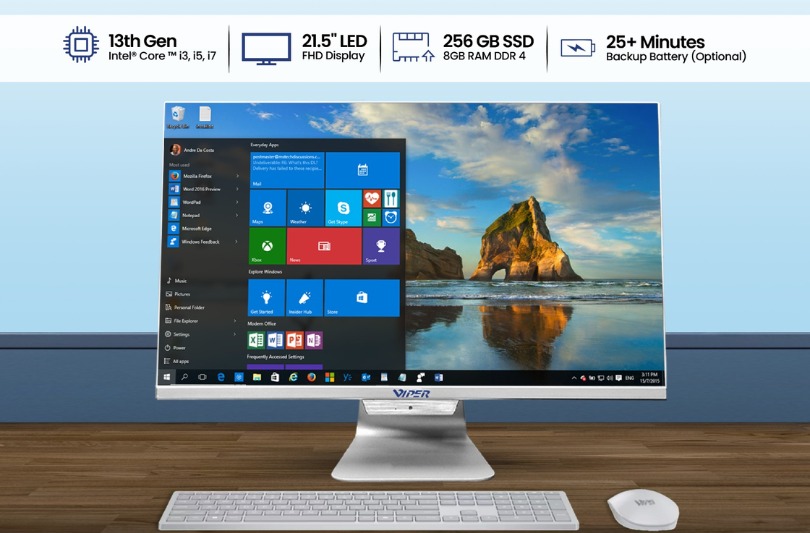
If you want powerful performance without occupying space, choosing a computer becomes difficult. A separate monitor and cables are required by conventional systems. The display and computer are combined in one portable component by all-in-one desktops.
The right integrated system offers a cleaner workstation for students, homes, professionals and offices. Choose specifications that aligns with your workload.
What Is an All-in-One Desktop?
The memory, display, hardware, storage, speakers and processor are integrated in an all-in-one desktop. There is no individual tower, yet you still have mouse and keyboard.
These systems conserve space and minimize clutter as compared to conventional systems. Various models include wireless networking, webcams and microphones. They are convenient for office tasks, meetings and online classes.
Why Choosing the Right All-in-One Desktop Matters
The functionality of all-in-one systems are not always same. A designer using innovative applications or an accountant managing large spreadsheets will have different requirements than a student attending video calls, online classes or browsing.
Paying for extra hardware can increase costs whereas insufficient RAM or storage can cause stagnation. Purchasers should plan ahead of time as scalability is often limited in tower-based PCs.
Key Features to Look for in an All-in-One Desktop
The processor helps the system to manage applications and multitasking effectively. Professional software needs more processing power than everyday office tasks.
Storage affects capacity and speed while RAM controls multiprogramming. HDDs provide storage for heavy documents folder. SSDs support application feedback and quicker startup.
Display quality and screen size are crucial as display is within the computer. The desk space, resolution and visual comfort should be considered. Online learning and video calls becomes easier with speakers and built-in webcam.
Wireless connectivity, HDMI, USB and networking should be checked for the items. If the product has slim frame, the build quality and cooling are crucial. Touchscreen is especially significant for interactive tasks or classrooms.
How to Choose the Right All-in-One Desktop
First, understand the purpose of system. Will the system be able to manage demanding professional software, study, presentations, browsing, creative work or office applications? The answers will guide the storage, processor and RAM decisions.
Fix a budget when looking at the all-in-one desktop price. Check if accessories, keyboard, warranty, operating system and mouse are included.
Keep the desk space in mind when selecting a screen size. Do I encourage space conservation over upgradeability? Can I expand storage or RAM for later use? Will the system be able to manage the workload?
The choices are also influenced by warranty, after-sales maintenance and brand image.
All-in-One Desktop vs. Traditional Desktop
For users who prefer clean aesthetics, simple and space efficient systems, all-in-one systems are ideal. When specific hardware, extensive expansion and component modification are important, a conventional system is best.
The Pacer desktop range and Pluto all-in-one family of Viper offers both styles. In addition to upgradeability, comfort and screen size, Pacer desktop specifications can also be considered when comparing them.
Before making a final decision, users can easily compare Pacer desktop price list Pakistan, Pacer desktop price in Pakistan or Pacer computer price in Pakistan.
What Should Buyers Consider When Purchasing Online or In-Store?
Ensure the listing matches with the RAM, display, processor, operating system and storage. The setup support, return or exchange terms, warranty and delivery should also be considered.
The seller verification should be done when buying Pacer or finding Pacer desktop PC for sale Pakistan. Rather than only focusing on the product name, the specification should be checked when exploring desktop system online Pakistan. Furthermore, verification of Pacer system authorized reseller Pakistan or Pacer system dealer Pakistan should be done through official websites.
Is an All-in-One Desktop Suitable for Everyone?
It is not always necessary. These systems are suitable for users who prefer static workstation, particularly in study spaces, offices, homes and reception areas. A tower desktop is better for users who require major visual upgrades or hardware replacement.
FAQs
What is an all-in-one desktop?
It integrates the monitor and computer hardware into one single unit.
Is an all-in-one desktop good for gaming?
It is solely based on the game requirements and visuals hardware as most models emphasize on efficiency.
Can you upgrade an all-in-one desktop?
In some models, the options are limited whereas some allows storage or memory upgrades.
What is the average all-in-one desktop price?
The price is not fixed. Processor, storage, accessories, RAM and screen size influences the price.
Is an all-in-one desktop better than a traditional desktop?
Tower PCs provide higher flexibility whereas all-in-one systems are ideal for simplicity and space efficiency.
Conclusion
The right all-in-one system balances screen quality, connectivity, future needs, support, space and functionality. For buyers who have compact or conventional workspaces, Viper offers Pacer desktop range along with its Pluto all-in-one systems. Choose the right configuration that resonates with your workload.