
Made in Pakistan

Biometric Tablets: How Do They Improve Security, Identity Verification, and Business Operations?

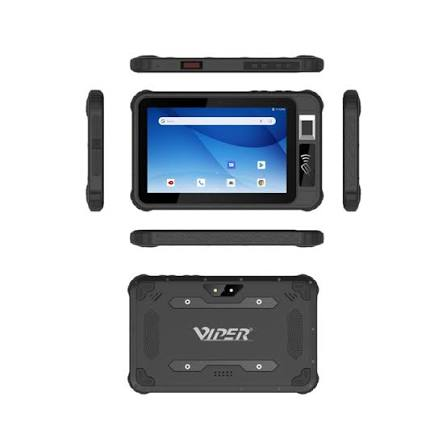
They can tell you if someone is signed in, but may not tell you what their name is. Before allowing access to a building or capturing an event, a biometric tablet can compare a fingerprint against an enrolled record. When evaluating biometric tablets in Pakistan, the initial task that arises is to unlock a shared device, verify an identity or log in a shift. Every task must have its own enrollment process, access rules and fallback.
How Biometric Tablets Strengthen Security and Identity Verification
During enrollment, a system typically creates a digital template from a captured fingerprint or other biometric trait. At verification, it compares a fresh sample with the enrolled template for the claimed identity. The match tells you whether the samples are sufficiently similar. The strength of the identity check also depends on how carefully you verified the person before linking their details to the template.
For sensitive digital sign-ins, pair the biometric check with a physical authenticator, such as a registered device holding a credential. NIST’s digital identity guidelines call for this combination and a non-biometric alternative. Ask where the matching takes place, how templates are protected and who can retrieve or delete them. A fingerprint is difficult to replace after exposure, so limit retention and restrict access to the people who need it.
How Biometric Tablets Fit into Daily Business Operations
When signing in to a timesheet, employees’ identity is confirmed at a warehouse, and supervisors can check timesheet punch history before they sign off on timesheets. Employees at service counters have the ability to use a verified match as one way to verify a customer’s identity before opening a restricted record at the service counter. Individual sign-ins on a shared tablet can assist in identifying who made the stock adjustments or approved the stock. These benefits are contingent with the software being able to link each successful check with the corresponding record, and to maintain a useful audit trail.
If you are comparing biometric tablets in Pakistan, then you should certainly look at Viper Android Tablet B08. Viper mentions a fingerprint sensor and access control, attendance and identity verification as possible applications. Inquire if there is a way to integrate the sensor with existing software, and if it will need a separate app or software development kit. Test the device at a location. Review enrollment time, recognition failures and what occurs if connectivity lapses occur. Queues may be uncovered during the trial of the shift change, which a quiet demonstration may not detect.
FAQs
Q1. What is a biometric tablet, and how does it work?
It’s a tablet that can serve to capture a physical characteristic like a fingerprint for identification. A compatible application compares the sample with enrolled data and based on the result, grants access or documents an event.
Q2. How do biometric tablets improve business security?
They can reduce reliance on shared passwords and help tie sensitive actions to individual accounts. The benefit is stronger when staff enroll under verified identities and the system records who signed in, what they did and when.
Q3. What are the main applications of biometric tablets in businesses?
They are typically used for employees to sign in, for accessing shared equipment or for identity verification at the customer service counter. The tablet will also be able to execute other work apps, when necessary, provided that the application is compatible with the operating platform of the tablet.
Q4. Are biometric tablets more secure than traditional password-based devices?
They can improve on a password-only setup when biometrics are combined with a physical authenticator and backed by secure recovery. Compare protections against fake samples, retry limits and fallback procedures before choosing a system.
Q5. Which biometric technologies are commonly used in tablets?
You have heard of fingerprint and facial recognition. There are also some special devices which can have iris recognition. Determine if the tablet has the capabilities to accept the biometric and if your business application can support it. Just a front camera isn’t enough to create secure face authentication.
Q6. How can biometric tablets improve employee attendance management?
A fingerprint check can reduce instances of one employee clocking in for another. When the attendance app syncs verified punches to timesheets, supervisors can spend less time entering records manually. Provide a documented fallback for missed scans and route corrections for approval.
Q7. Which industries benefit most from biometric tablets?
Shift check-ins for warehousing or manufacturing or individual sign-ins for shared equipment in retail or hospitality. The devices can be implemented for controlled identity checks where the entire workflow fulfills the organization’s verification needs for financial service.
Q8. What should businesses consider when purchasing a biometric tablet?
Check sensor compatibility with your applications, operating system updates, warranty and local support. Ask the supplier to demonstrate how an administrator securely removes a departed employee’s enrollment. Confirm how the device protects biometric templates and handles offline events. Test failed scans and recovery alongside successful matches, since both affect how the system works on a busy day.